HTML email QA
HTML email QA for every language
The check runs on the compiled file, once per language, before export. It flags blockers in the HTML. It does not show a screenshot from Gmail or Outlook.
Updated 5 October 2026
Start Building FreeWhat email QA in EmailStitch covers
HTML email QA in EmailStitch is a check on the finished email, once per translation, before the file reaches Mailchimp, Klaviyo, Brevo, HubSpot, ActiveCampaign, or Omnisend. It ranks mechanical failures. It does not show a screenshot from Gmail or Outlook.
The check sits inside HTML email production. You still build and translate in the same workspace. Every plan includes the full QA engine. You can start free.
What HTML email QA catches
A link that 404s, an unsubscribe a client will not see, a merge tag that renders as raw braces, HTML heavy enough for Gmail to clip. These do not show up in the inbox you test on your own machine. They show up in a subscriber’s client, or in a translation you do not read.
The same failures are written up in email template coding mistakes. The check surfaces them on the compiled template, per translation, before anyone pushes to the ESP. For a single email with no account, use the free email template tester.
- Broken link
- A URL that 404s.
- Missing unsubscribe
- Nothing a client will see, or the wrong tag for the active ESP.
- Unresolved merge tag
- Raw braces left in the compiled file.
- Weight
- HTML heavy enough for Gmail to clip.
- Missing alt
- An image with no alt text.
- Empty translation
- A locale key with no string, on the translation you are previewing.
Findings ranked by how much they matter
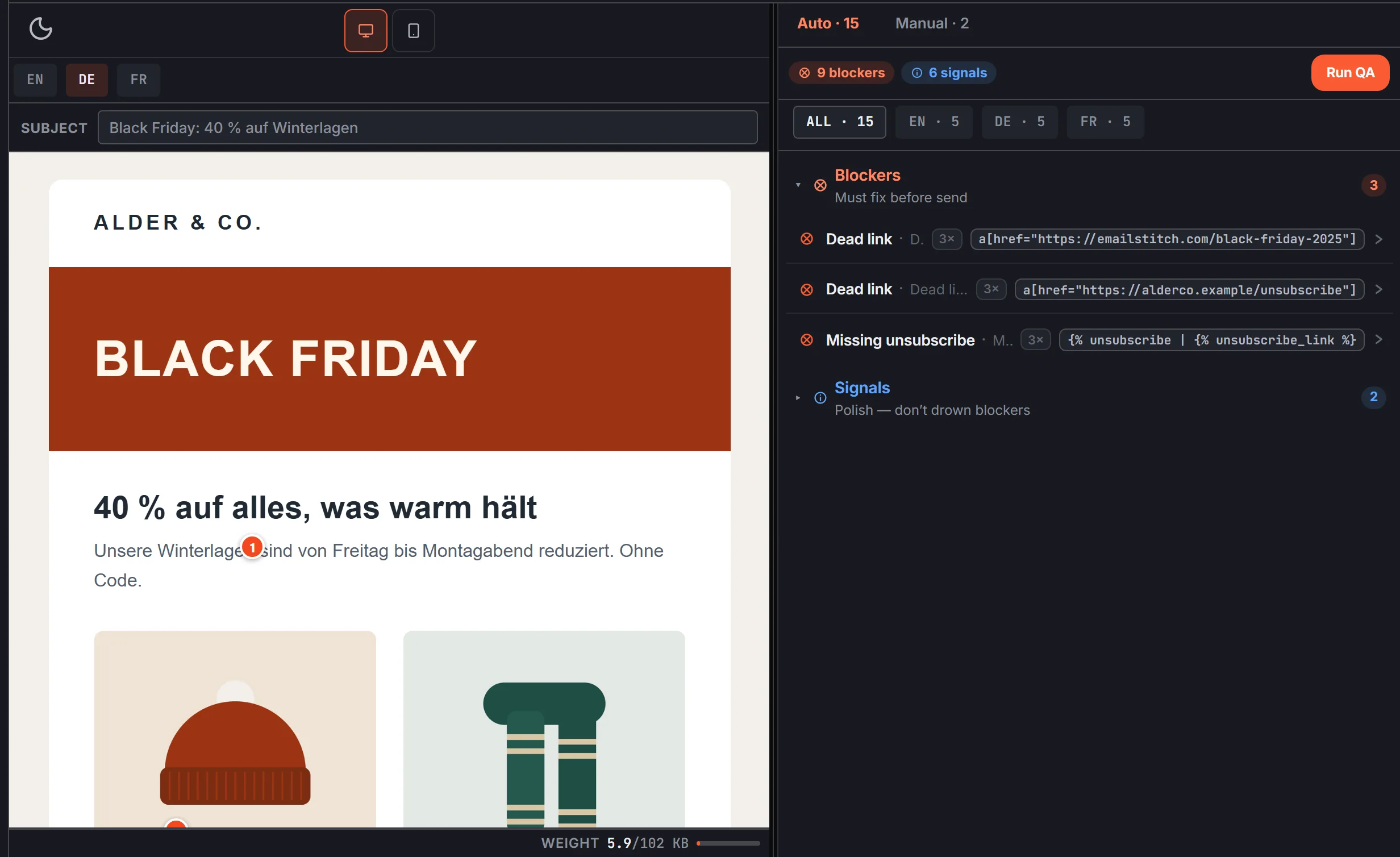
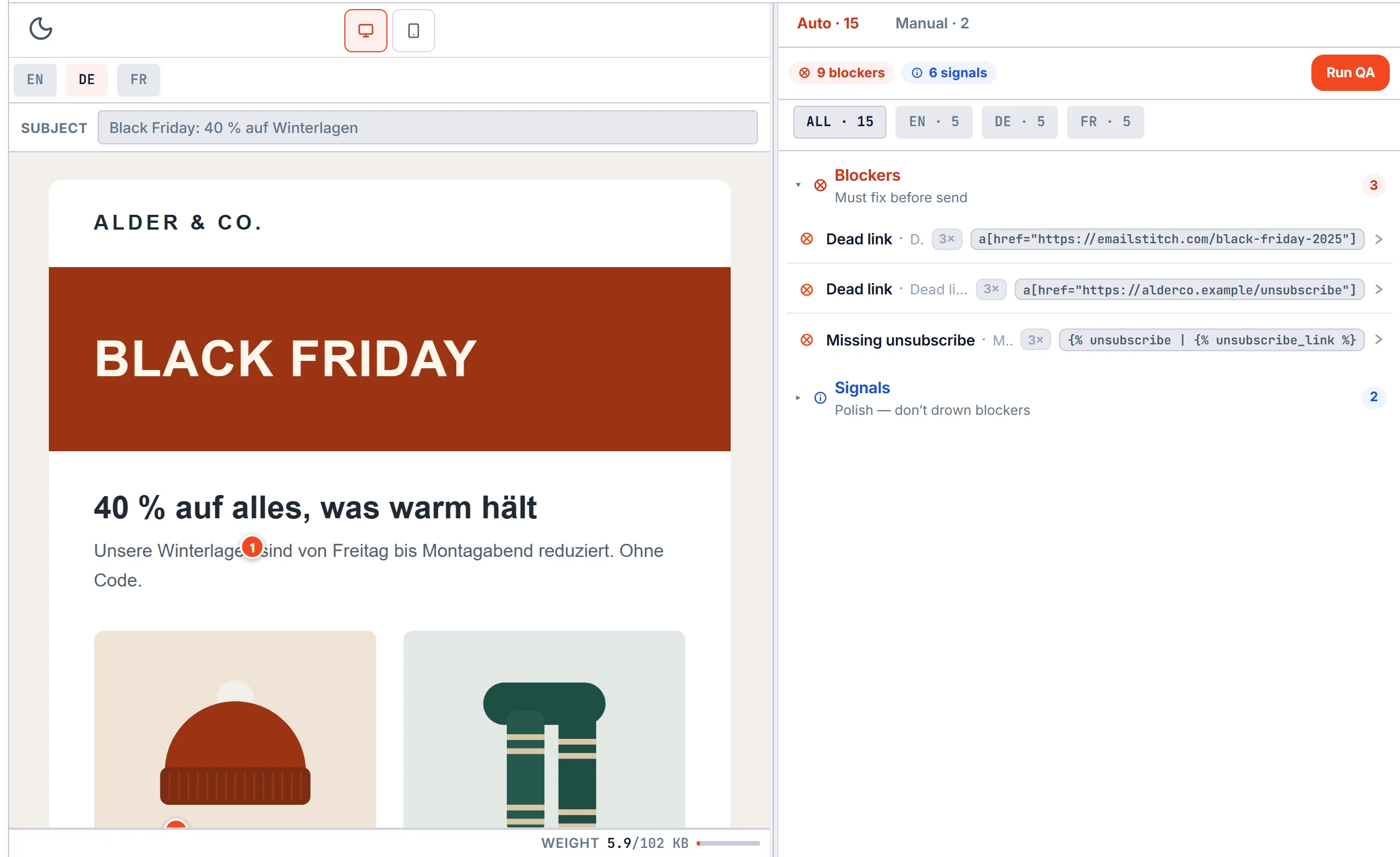
Auto QA sorts findings into blockers, high risk, fix soon, and signals. Blockers are must-fix before send. High risk can break the template or the data. Fix soon matters, and does not hold the release. Signals are polish, so they do not bury a missing unsubscribe.
Quick fix resolves the deterministic ones in one click. The rest stay listed next to the preview, with the translation they belong to, so you are not hunting through a flat log.
The active ESP changes the unsubscribe check
A visible unsubscribe link is not the same string in every ESP. If Klaviyo is the active connection, a plain word in the footer is not Klaviyo’s unsubscribe tag. Auto QA checks the placeholder that ESP expects, and says so, instead of treating every vendor as identical.
That is as far as this page goes on any one ESP. Which tags a vendor wants, and how push names the template, belong with that integration. QA’s job is to stop the wrong file leaving.
What this test does not cover
A test HTML email to your own inbox does not replace this list. It is one render, in one client, for one translation.
An email rendering test across clients, a dark-mode pass, and a spam score sit outside Auto QA. This page does not cover them.
Human review is a different job
Auto QA does not decide if the French reads well, or if the layout actually holds in Outlook. Those calls stay with a person. Comments on the email and the five-point sign-off live on review and approval.
Empty translation keys are a QA finding. Filling them is localization. The check and the translation grid are not the same screen, on purpose.
Related
Questions
Does Auto QA replace inbox testing?
No. It catches mechanical failures: links, unsubscribe, unresolved tags, weight, missing alt, empty translation strings. Whether the layout holds in a specific client is still a human check.
What is a blocker versus a signal?
Blockers must be fixed before send. High risk can break the template or the data. Fix soon is important and does not hold the release. Signals are polish, so they stay out of the way of a real failure.
Does QA look at every translation?
Yes. Findings are tied to the translation you are previewing, including empty translation keys. A clean primary translation is not a clean send.
Is HTML email QA the same as an email preview tool?
No. An email preview tool shows how a message renders. This check ranks mechanical failures on the compiled file: links, unsubscribe, unresolved tags, weight, missing alt, and empty translation strings. Each finding stays on the translation you are previewing. Screenshots of Gmail or Outlook are a different job.
Run the check before you export
Create an account. Shared HTML, translations, QA, and ESP push in one workspace.
Start Building Free