Email review
Review and Approve Email in Context
Comments land on the email. Final checks are the last human pass. The version you approve is the version that can publish.
Start building freeComments sit on the email
Feedback in a doc, a Slack thread, or a screenshot loses the block it was about. By the time someone maps the note back to the HTML, the file has moved. Email review works when the comment is pinned to the preview, with the thread and the reply on that spot.
The person commenting does not have to open the HTML. The structure stays locked. They are marking the message, not editing the tables.
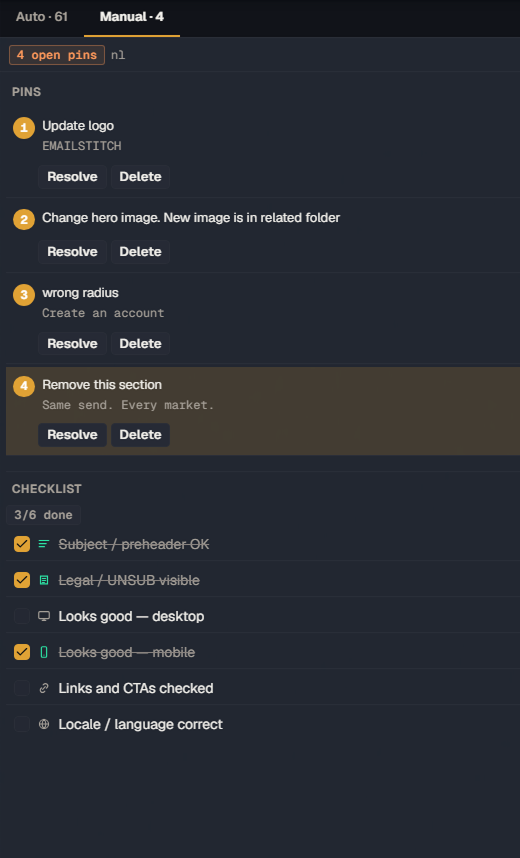
Final checks before publish
Final checks are a short list beside the preview: the human items that are not a linter rule. You can see what is done and what is still open without leaving the email you are about to send.
A share link lets someone outside the workspace review that same email in context. They see the message, not a ZIP and a request to “take a look”.
A version someone can approve
Approval is a state on a version, not a sentence in a chat. Version history keeps the file you signed. Publish uses that compiled output, per translation, as a push to your ESP or a ZIP.
Technical findings are not re-litigated here. Broken links, missing unsubscribe, and empty translation strings come from HTML email QA. This page is the human pass: comments, the checklist, and the decision to ship.
Related
Questions
Is review the same thing as Auto QA?
No. Auto QA ranks mechanical issues. Review is comments on the email, final checks, and an approval state on a version. One does not replace the other.
Can someone comment without editing the HTML?
Yes. Comments pin to the preview. Text, images, and links are the editable fields. The table structure is not selectable.
Can a client review without joining the workspace?
A share link gives someone outside the workspace the email in context, instead of a file over email. Plan limits on how many links are active are listed on the pricing page.
Review the email on the email
Create an account. Shared HTML, translations, QA, and ESP push in one workspace.
Start building free