Email Preheader (Preview Text): Length, HTML Code and Examples
An email preheader is the preview text next to the subject line in the inbox. How long it should be, examples that work, the HTML to set it, and how to stop it showing in the email.
An email preheader, also called preview text, is the line the inbox shows next to or under the subject before anyone opens the email. You set it with a hidden block at the very top of the HTML body. If you don’t set one, the inbox uses the first text it finds in the email, which is often “View in browser” or the alt text of your logo.
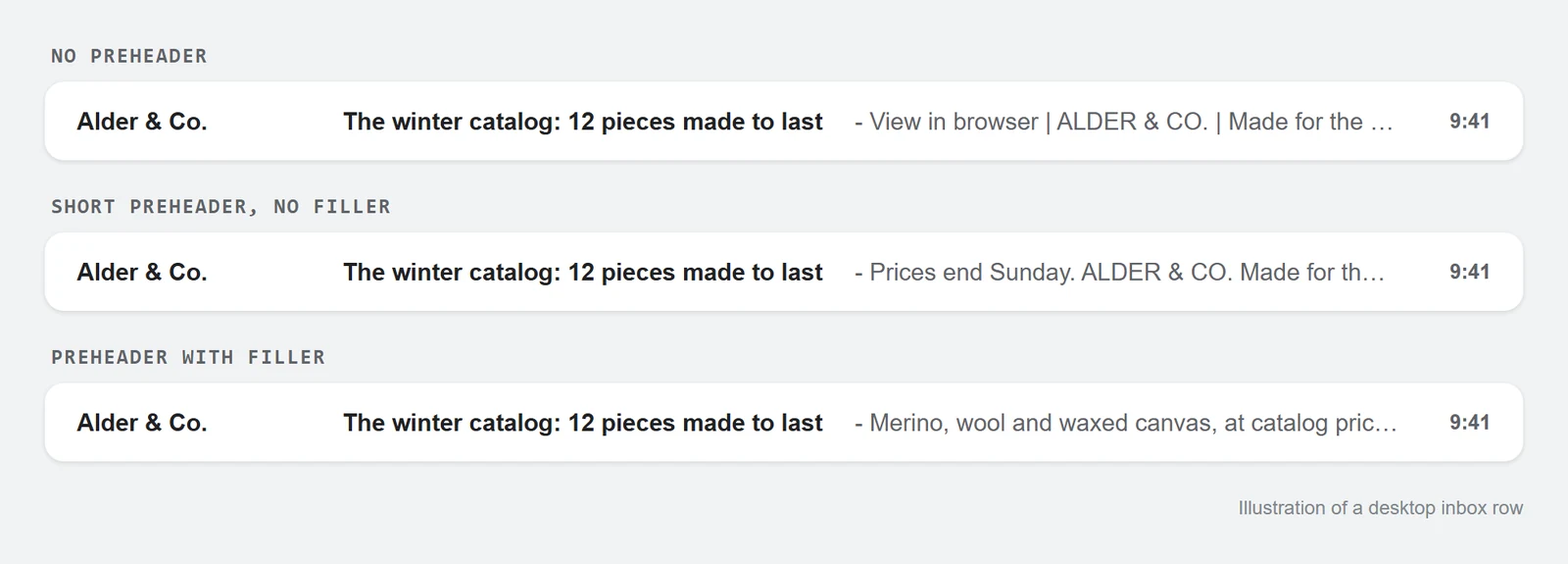
Everyone who sees your subject line also sees the preheader, including the people who never open the email. That makes it the second line of every send.
How to write a good preheader
The subject line gets attention, and the preheader gives the reader a reason to open. Don’t repeat the subject. Add the detail that the subject left out: the deadline, the product, the number, or what’s inside.
| Subject | Weak preheader | Better preheader |
|---|---|---|
| The winter catalog is here | View in browser | Merino, wool and waxed canvas, at catalog prices until Sunday |
| Your order has shipped | Thanks for your order! | Arrives Thursday. Track it or change the address here. |
| 40% off everything warm | Don’t miss out! | Ends Monday at midnight. No code needed. |
| We’re raising prices in March | Important update | Your current price stays until your next renewal. |
| Webinar: email QA in 30 minutes | Join us! | Thursday 5pm CET. We’ll check three real campaigns live. |
The pattern in the right-hand column: a concrete fact the reader can use, and nothing that only makes sense after opening.
How long should a preheader be?
Aim for 40 to 130 characters and put the point in the first 40. Phones show fewer characters than desktop, often 40 to 90 depending on the app and screen. Longer text gets cut off mid-word. Shorter text leaves room that the inbox fills with the start of your email body, unless you add filler (see the code below).
The range is a guideline. Before a big send, check the inbox row on a phone.
Email preheader HTML code
Put one hidden block first inside <body>, before the logo and before any “View in browser” link:
<body>
<div style="display:none;font-size:1px;line-height:1px;max-height:0;max-width:0;opacity:0;overflow:hidden;mso-hide:all;">
Merino, wool and waxed canvas, at catalog prices until Sunday night.
͏‌ ͏‌ ͏‌ ͏‌ ͏‌ ͏‌
</div>
<!-- view in browser, logo, hero… -->The styles hide the text in the opened email in every client, and mso-hide:all covers classic Outlook for Windows. The run of ͏‌ after the sentence is invisible filler. It takes up the rest of the preview space, so the inbox doesn’t add the first words of your email after your preheader. Repeat it until it fills a desktop preview, which usually takes a few dozen repeats.
What you see in the inbox, and why
| In the inbox | What happened |
|---|---|
| View in browser, or the logo’s alt text | No preheader. The inbox used the first text in the file. |
| Your sentence, then the start of the email | The preheader is short and has no filler after it. |
| Your sentence as the first line of the opened email | The hiding styles are missing or a client ignored them. |
| A different preview line in different apps | There are two preheaders: yours and one your ESP added. |
| Your sentence and nothing else | It works. |
Preheader in the HTML or in your ESP’s preview text field
Mailchimp, Klaviyo and most other ESPs have a preview text field next to the subject. When you fill it in, the ESP adds its own hidden block to the top of the email when it sends. If your HTML already has one, the email now has two, and different apps may show different ones.
Use one or the other. If the email is built and translated outside the ESP, keep the preheader in the HTML and leave the ESP field empty. That way the preheader is translated and reviewed together with the rest of the email.
One preheader per language
In a multilingual email, store the preheader as a translation like the headline, for example {{locale.preheader}}, so each language gets its own line. An English preheader in a German inbox is an untranslated string in the one place every recipient reads.
After the translations are filled in, search the final HTML for {{. A preheader left as a raw placeholder shows the braces in the inbox, which is worse than having no preheader at all.
How EmailStitch flags preheader problems
EmailStitch is the email production tool this blog belongs to. Its Review step looks for the hidden preheader block in every language version. If the block is there but the hiding styles are missing, the preview shows the sentence at the top of the email and Review lists a Preheader finding under Fix soon (“Preheader leak”) for each language:

A missing or empty preheader, or one too short to be a sentence, is also listed under Fix soon. A length outside about 40 to 130 characters shows up as a Signal. None of these stop you from publishing. The inbox row on a phone is still the final check.
Before you send
- A hidden block is the first thing in
<body>, withmso-hide:all. - The sentence is 40 to 130 characters, with the point in the first 40.
- Filler follows the sentence.
- Either the ESP preview text field is empty or the HTML block is gone, not both filled.
- Every language has its own preheader, and no
{{is left in the final HTML.
The preheader is the first line readers see. The last one, the unsubscribe link, can be hidden by Gmail’s clipping. Every other pre-send check is on the HTML email QA checklist.
FAQ
What is the difference between a preheader and preview text?
They’re the same thing. “Preheader” is the name in HTML email code, and “preview text” is the name most ESPs use for the field.
Does every email need a preheader?
Yes. Without one, the inbox shows whatever text comes first in the email, which is rarely the line you’d choose.
Why is my preheader showing in the email?
The hiding styles are missing or incomplete. Use the full set from the code above, including display:none, max-height:0, opacity:0, overflow:hidden and mso-hide:all.
Can I use emoji in a preheader?
Yes. Most inboxes show them. Count each emoji as about two characters toward the length, and don’t rely on one to carry the meaning.