HTML email localization
Localize HTML Email Without Duplicating Templates
One Shared HTML file. Each market gets its own copy, images, links, and subject line. The layout does not fork.
Start building freeA file per market does not scale
The usual fix for a new language is another HTML file. German gains a row English never got. French still has an English sentence. A link points at the wrong regional page. Someone has to remember which file is the real one.
Duplicating templates feels safe because each market is isolated. It is also how multilingual email templates drift apart, one campaign at a time.
One template, many translations
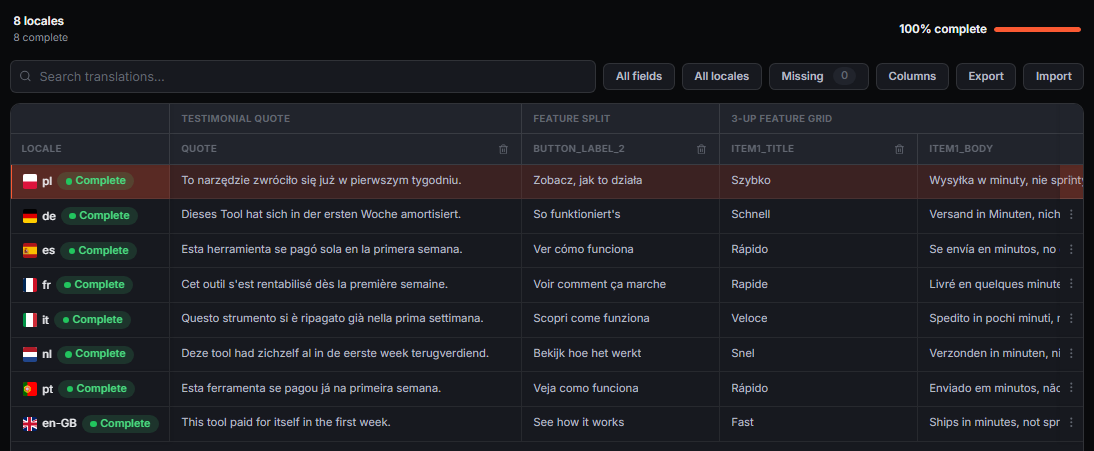
EmailStitch keeps a single Shared HTML file and a set of {{locale.key}} tokens. Add a translation and it inherits the same layout, with its own copy, subject line, and links. Images can swap per market. The tables, the MSO conditionals, and the structure stay where the developer left them.
This is one stage of the HTML email production workflow. Localization is the stage. It is not a second product you bolt on after the HTML is finished.
What is allowed to change
Per translation: text, images, links, and the subject line. Not the table structure. Editing on the live preview only exposes those fields, so a translator or marketer can rewrite a market without selecting a td.
Links remap with the translation. A button does not keep sending the German reader to the English URL because that href was copied with the file.
Translations in and out of a spreadsheet
Import or export translations as CSV or Excel instead of keeping a separate file in sync by hand. The grid and the spreadsheet are two views of the same tokens, not two sources of truth.
When a translation is missing a string, that shows up in HTML email QA as an empty fallback, next to the other things that should not reach the ESP. You still translate here. QA only tells you a market is incomplete.
Related
Questions
Do I duplicate the template for each language?
No. There is one Shared HTML file. Each translation has its own copy, subject, images, and links. The layout is inherited, not copied.
Can translators work in a spreadsheet?
Yes. Import and export the translation strings as CSV or Excel. The tokens in the HTML stay the source of the layout.
Does adding a translation change the layout?
No. A new translation starts from the same structure. What changes is the content bound to {{locale.key}} tokens, not the tables underneath.
Add a market without cloning the template
Create an account. Shared HTML, translations, QA, and ESP push in one workspace.
Start building free