Best Fonts for Email, and Why Outlook Shows Times New Roman
The best fonts for email are the ones already installed on your readers' devices. A table of web-safe fonts with stacks to copy, and the fix for Outlook's Times New Roman fallback.
The best fonts for email are the ones already installed on the reader’s device: Arial, Helvetica, Verdana, Tahoma, Trebuchet MS, Georgia and Times New Roman. Email clients can’t be relied on to download a font, so a font that isn’t on the device gets replaced. End every font-family with sans-serif or serif. If you use a brand webfont, give classic Outlook for Windows its own stack, or it will show Times New Roman.
Here is the same headline from one of our test emails. The only change is the font-family value:
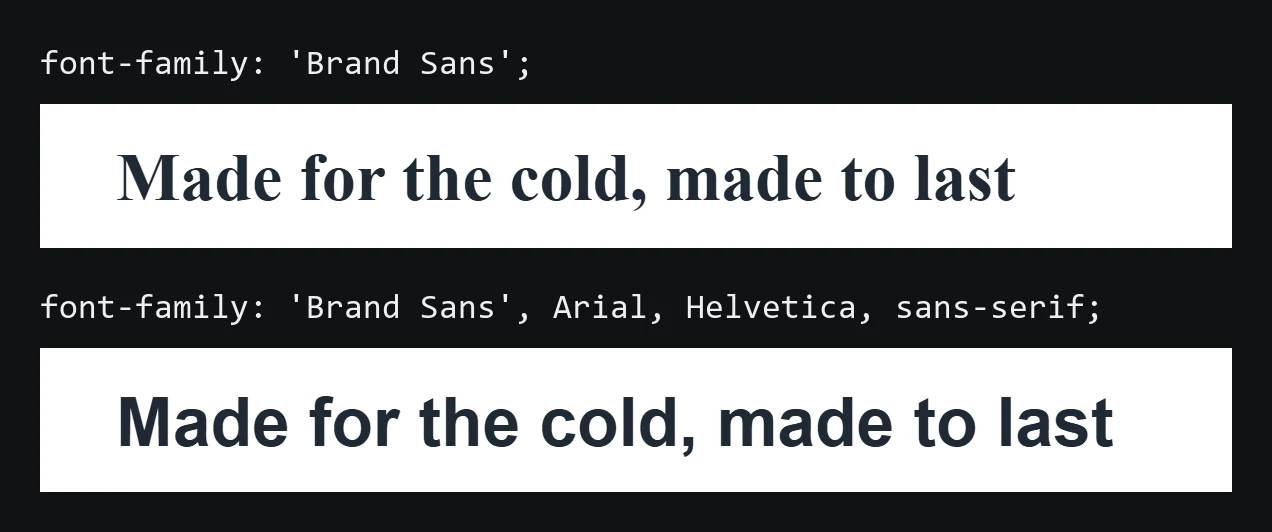
Best fonts for email
These fonts ship with Windows and macOS, and iOS has most of them. Android ships only its own fonts, such as Roboto, so on Android phones the generic family at the end of the stack does the work. Copy the whole stack, not just the first name.
| Font | Style | Good for | Stack to copy |
|---|---|---|---|
| Arial | Sans serif, neutral | Body text, buttons | Arial, Helvetica, sans-serif |
| Helvetica | Sans serif, neutral | Body text on Apple devices | Helvetica, Arial, sans-serif |
| Verdana | Sans serif, wide | Small text, footers | Verdana, Geneva, sans-serif |
| Tahoma | Sans serif, narrow | Dense layouts, tables | Tahoma, Verdana, sans-serif |
| Trebuchet MS | Sans serif, rounded | Headlines | 'Trebuchet MS', Arial, sans-serif |
| Georgia | Serif, readable on screen | Editorial headlines, newsletters | Georgia, 'Times New Roman', serif |
| Times New Roman | Serif, compact | Formal or legal text | 'Times New Roman', Times, serif |
| Courier New | Monospace | Codes, order numbers | 'Courier New', Courier, monospace |
If you have no brand rule, Arial, Helvetica, sans-serif for body text and Georgia for headlines covers almost every inbox. Calibri and Segoe UI are installed on most Windows machines but missing from many Macs and Android phones, so use them only with a full fallback stack behind them.
Put the stack inline on every cell that holds text. Some clients strip or ignore parts of a <style> block, and the inline copy is the one that survives:
<td style="font-family:Arial, Helvetica, sans-serif;font-size:16px;line-height:24px;color:#1f2933;">
  The sentence you want read.
</td>
Why Outlook shows Times New Roman
Classic Outlook for Windows (Outlook 2016, 2019, 2021 and the Microsoft 365 desktop app) renders email with Microsoft Word. Word doesn’t download webfonts. It fails in two ways:
- None of the fonts in the stack are installed.
font-family:'Brand Sans'with nothing after it. Word doesn’t know Brand Sans and uses its default, Times New Roman. - A webfont is listed first.
font-family:'Brand Sans', Arial, sans-serifwith Brand Sans loaded through@font-face. Word often sees the webfont, can’t load it and goes straight to Times New Roman without trying Arial.
The second case catches people out because the code looks right in review. New Outlook for Windows, Outlook for Mac and Outlook on the web don’t use Word, so they follow the stack the way a browser does.
How to keep a brand webfont and still look right in Outlook
Apple Mail, iOS Mail and Outlook for Mac load webfonts. Gmail and classic Outlook for Windows don’t. If the brand font matters to you, keep it first in the stack for the clients that load it, and add a block that only classic Outlook reads:
<!--[if mso]>
<style>
  td, th, div, p, a, span, h1, h2, h3, h4, h5, h6 {
    font-family: Arial, Helvetica, sans-serif !important;
  }
</style>
<![endif]-->
Put it in the <head>, after your other styles. Other clients ignore everything between <!--[if mso]> and <![endif]-->, so Outlook gets Arial and Apple Mail keeps the brand font.
What font size to use in email
Use 16px for body text with a line height of about 1.5 (24px), and 22–28px for headlines. Don’t go below 14px for anything a reader needs, including the footer. iOS Mail enlarges text smaller than 13px by itself, which can break a layout you tested on desktop.
Set the font stack once for every email
When every template types its own stack, one of them eventually ships with a missing fallback. Save the stack once, for example as a design token that every template references, and fixing it in one place fixes every email. The design tokens guide shows how that works, and the email design system page shows it in EmailStitch.
How EmailStitch flags a missing fallback
EmailStitch is the email production tool this blog belongs to. Its Review step checks every font stack in every language version. A stack with no web-safe font and no generic family shows up under Fix soon as Non web-safe font, with the element it found and the fix:
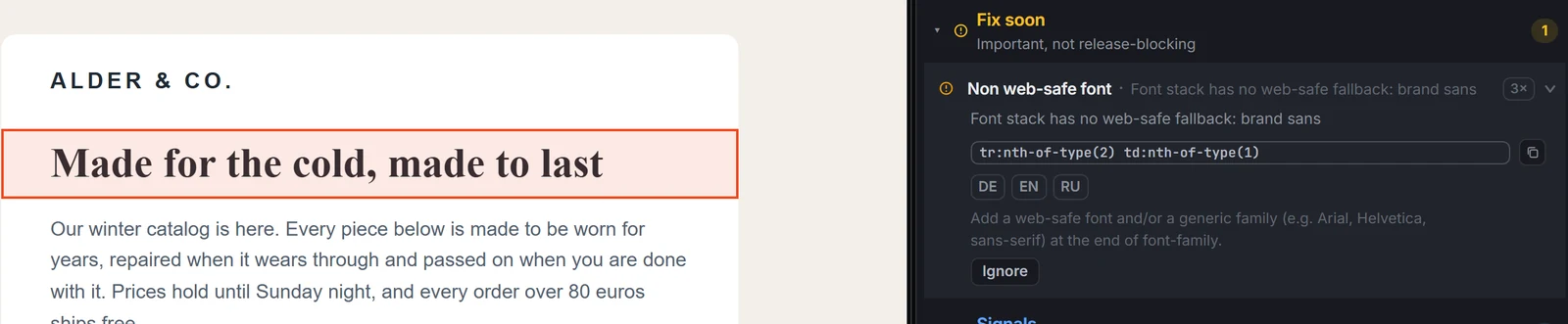
It doesn’t flag 'Brand Sans', Arial, sans-serif, because that stack has a fallback. The webfont-first problem happens inside Word, so no check on the HTML can prove it’s fixed. Two things can: the <!--[if mso]> block in the <head>, and one test send opened in classic Outlook for Windows.
Before you send
- Every text cell has a stack that ends in
sans-seriforserif. - If a webfont comes first, the
<!--[if mso]>block is in the<head>. - Body text is at least 14px, ideally 16px.
- One test send was opened in classic Outlook for Windows.
Fonts are one item on a longer list. The rest is in email template coding mistakes and on the HTML email QA checklist.
FAQ
What is the safest font for email?
Arial. It’s installed on Windows, macOS and iOS, and Android replaces it with its own sans serif. Write it as Arial, Helvetica, sans-serif so every device has a fallback.
Can I use Google Fonts in email?
Yes, as a bonus. Load it with @font-face or a <link> and list it first. Apple Mail, iOS Mail and Outlook for Mac will show it. Gmail and classic Outlook for Windows won’t, so the stack after it decides what most readers see.
Why does my email look different in Gmail and Outlook?
Gmail ignores webfonts and uses the next font in your stack. Classic Outlook for Windows uses Word, which falls back to Times New Roman when it can’t find or load the font. Ending the stack with a web-safe font and a generic family makes both predictable.
Is Calibri safe for email?
Only on Windows. Many Macs and most phones don’t have Calibri, so a stack like Calibri, Arial, sans-serif is fine, while Calibri alone isn’t.