Email Design System: What Has to Live in the HTML
An email design system is named colors and fonts in the HTML you send. Change a token once. Every template that uses it picks up the value.
An email design system is the named colors and fonts your HTML already references. Change a token once. Every template that uses it picks up the new value when you compile the file for a ZIP, or for a push to the ESP.
A component gallery or a Figma file can show a hero, a product row, and a footer. The message your ESP sends still needs the color, the font stack, and the module written into HTML you can send. Build that palette on your HTML.
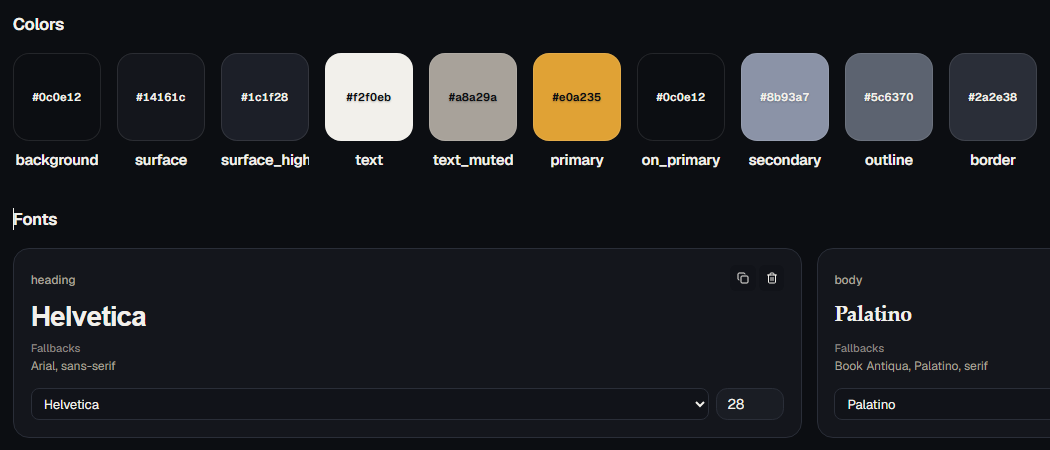
Colors and fonts as tokens
Point the HTML at names, not at one-off values:
{{theme.color.primary}}for a named color{{theme.font.heading}}or{{theme.font.body}}for a named stack{{theme.size.body}}for a named size
A workspace holds up to 40 colors and 20 fonts. Names are unique. A font can be a web-safe stack, such as Arial, Georgia, or Verdana with a generic fallback, or a custom family. An optional size runs from 8 to 96 pixels.
One template gets the new blue. The next campaign still has last year’s hex in a footer nobody opened. Named tokens are how you stop that split.
Compile writes the current value into the file you ZIP or push to Mailchimp, Klaviyo, Brevo, HubSpot, ActiveCampaign, or Omnisend. The live preview uses the same substitution. An unknown token stays in the HTML as the placeholder. HTML email QA can flag that leftover before export.
Modules the team already proved
A module is a block that already survived a send: a hero, a product row, a footer with a real unsubscribe. Marketers place those blocks on a canvas. They edit text, images, and links. The table structure stays with the people who own the HTML, and it is not selectable in the field editor.
The export stays standard HTML, with the token values filled in. There is no EmailStitch runtime attached to the file you hand an ESP.
Developers can still open the HTML editor and change the structure. The canvas and the editor are two ways into the same file.
What email design system examples usually show
Published email design system examples are a picture of a hero or a footer. You can design the campaign in Figma. The email stays on brand because the HTML references the token, so nobody has to re-copy a hex into the next file.
When you look at an example, check whether you could drop the color and the font into a template you already send. A gallery that cannot name the token is a mood board. The system is the token the compiled file contains.
The same palette in every market
The same HTML carries each translation. Copy, images, links, and subject can change per market through {{locale.*}} tokens. The theme tokens stay, so a new language keeps the layout and the palette. Empty strings show up in QA. Filling them is a multilingual email job, separate from the palette.
Where the system lives
Keep the palette on the HTML you send. The email design system sits in the same workspace as the template, the translations, and the preflight. Start a free EmailStitch account and point the next template at the tokens instead of pasting the hex again.